3d-db GitHub ↗
Booting Postgres in this tab

PostgreSQL · MySQL · MariaDB · SQL Server · MongoDB
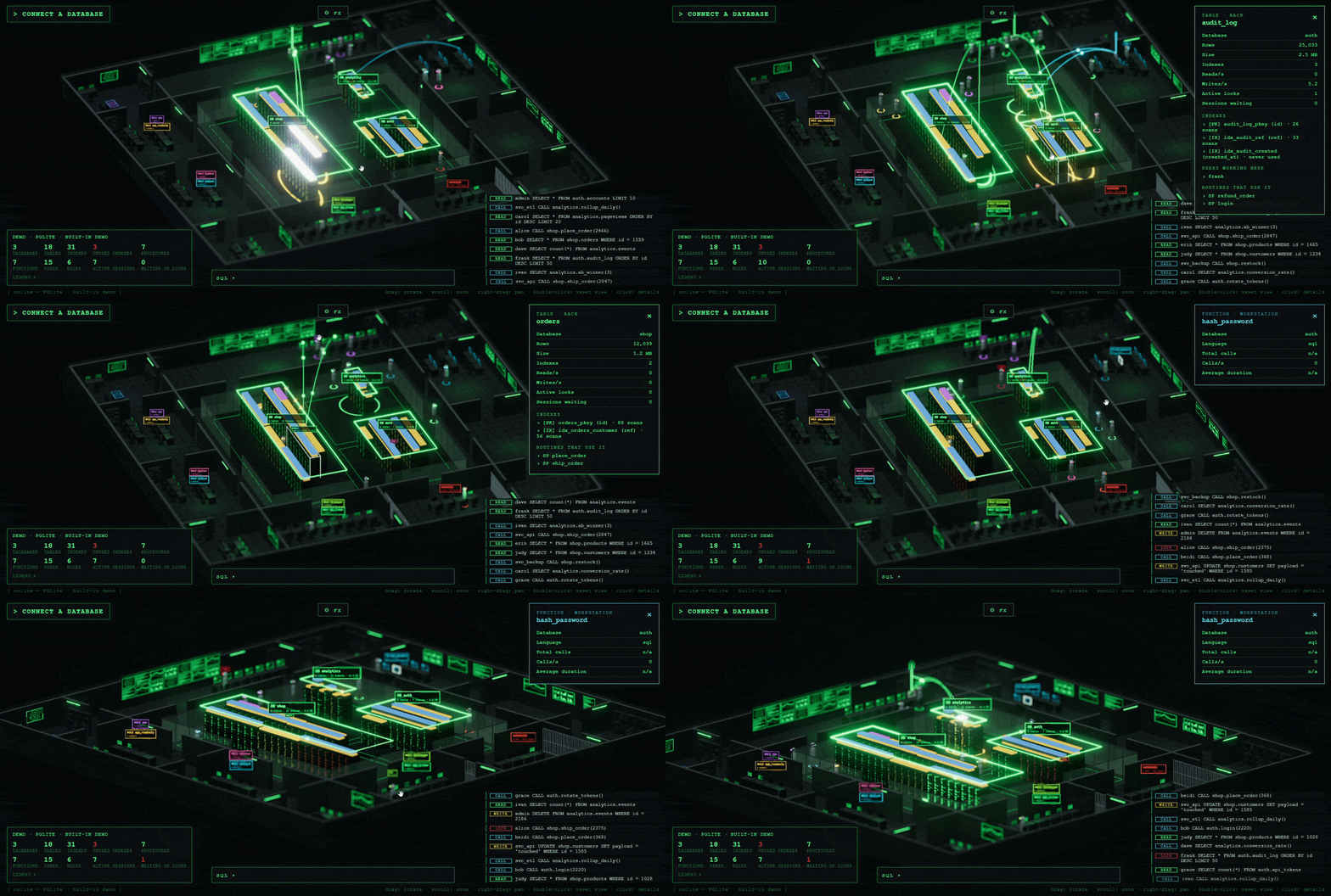
Your database, as a place you can walk through.

Every table is a rack. Every query is a pulse. Every user walks the floor. What you see above is a real Postgres, compiled to WASM, running in this tab.

Open the full demo
01 The idea

A database is the busiest place in your stack and the one you can't see. You get a wall of numbers, a slow-query log and a hunch. 3d-db reads the catalog and the profiler and builds a room out of them. You understand the state of the system in two seconds, then click anything to go deep.

Install
None. npx runs it.
Signup
None. Runs on your machine.
Writes
Zero. Read-only by design.
Refresh
Every second, from the profiler.
3d-db showing a live PostgreSQL database as an isometric datacenter
Recorded on a real PostgreSQLRacks pulse on every query · people walk to their sessions
02 Reading the floor

Nothing on screen
is decoration.

Each object maps to one thing in your database. Learn the map once, then read the room at a glance.

  1. Zone of the central hall
    Database. The sign reads DB name.
  2. Rack
    Table or collection. Width is log(rows), height is log(bytes).
  3. Rack pulse
    One query. Green read, yellow write, cyan schema change.
  4. Rack lights
    Reads and writes per second. Amber means locks held, red means sessions waiting.
  5. Slabs on top of a rack
    Indexes. Gold primary key, violet unique, blue plain, grey never scanned.
  6. Workstation
    Green in the control room: stored procedure. Cyan in ops and analytics: function.
  7. Glowing arc
    A routine call reaching the tables its code touches.
  8. Person
    User. Visor color is the role; a dark visor means not connected. Walking to a rack means an active session there.
  9. Office with a ROLE sign
    Role or group. The cage holds the superusers.
  10. Red tag over a head
    That session is waiting on a lock. Follow the pile to find who holds it.
03 What you spot in two seconds
a

The table on fire

Its rack flashes on every query while the rest of the floor is calm.

b

The lock pile-up

Red tags stack on one rack, and you can see who is waiting for whom.

c

Dead weight

Grey slabs are indexes nobody ever scanned. They cost you on every write and return nothing.

d

A deploy in progress

A new table rises from the floor in a cyan ring. A dropped one dissolves in red.

e

Who is really working

People walk to the tables their sessions touch. Idle accounts stay in their offices.

04 Install

One command.
Zero setup.

3d-db ships as a single npm package. npx downloads it, starts a local server and opens a browser tab connected to your database. Close the terminal and it is gone.

  • Node18.17 or newer
  • OSmacOS, Linux, Windows
  • UIhttp://127.0.0.1:4000
  • LicenseMIT

Every flag

Connection
--type <type>postgres, mysql (or mariadb), mssql (or sqlserver), mongo (or mongodb), demo
--server, --hostDatabase host. Default: localhost
--port <n>Database port. Default: the type's standard port
--user <name>Default: postgres, root or sa, by type
--database, --dbDatabase to start from
--string, --urlA full connection string instead of the flags above. Flags given with it override its parts.
--sslUse TLS. Certificates are not verified, so self-signed servers work.
--captureMySQL / MariaDB with performance_schema off: capture every statement through the general log. Restored on exit, needs SUPER.
Passwords
--ask-passwordPrompt for it. Recommended.
THREEDDB_PASSWORDEnvironment variable.
THREEDDB_URLWhole connection string from the environment.
--password <p>Works, but stays in your shell history.
Server
--ui-port <n>Port for the web UI. Default: 4000, or the next free one
--bind <address>Default 127.0.0.1. The UI has no login: bind elsewhere only on networks you trust.
--no-openDon't open the browser
-h, -vHelp, version

Connection strings it understands

  • postgres://user:pass@host:5432/db
  • mysql://user:pass@host:3306/db
  • mariadb://user:pass@host/db
  • mssql://user:pass@host:1433/db
  • Server=host,1433;Database=db;User Id=u;Password=p;
  • mongodb://user:pass@host:27017/db
  • mongodb+srv://user:pass@cluster/db
05 Where the data comes from

Your server's own
catalog and profiler.

Cumulative counters are read every second and turned into per-second rates and events. The catalog is re-read as soon as its digest changes, so a CREATE TABLE shows up live.

EngineCatalogProfiler
PostgreSQL pg_database, pg_stat_user_tables, pg_index, pg_class, pg_am, pg_proc, pg_roles, pg_auth_members pg_stat_user_tables, pg_stat_user_indexes, pg_locks, pg_stat_user_functions, pg_stat_activity
MySQL / MariaDB information_schema.schemata, tables, statistics, routines; mysql.innodb_index_stats, mysql.user, role edges performance_schema (table and index io waits, statements by program, data_locks), processlist, or the general log
SQL Server sys.databases, sys.tables, sys.indexes, sys.index_columns, sys.objects, sys.sql_modules, sys.server_principals dm_db_index_usage_stats, dm_exec_procedure_stats, dm_exec_function_stats, dm_tran_locks, dm_exec_sessions, dm_exec_requests
MongoDB listDatabases, $collStats, listIndexes, system.js, usersInfo, rolesInfo top, $indexStats, $currentOp, dbStats

Some views need privileges (pg_read_all_stats, VIEW SERVER STATE, performance_schema). When one is missing, that part of the room stays empty and the rest keeps working.

06 Safe by design

Read-only

3d-db never writes to your database. The SQL console only exists in the sandboxed demo.

Local by default

It listens on 127.0.0.1. Nothing leaves your machine, and there is no account to create.

No secrets in history

Use --ask-password or an environment variable. Errors are scrubbed of passwords before they reach the UI.

Copied